
Skip to content

Software for business owners · Rekana Rechnung

Write invoices and e‑invoices, match receipts

Rekana Rechnung handles quotes, invoices, e-invoices, bank statements, and receipts in one program. At month-end, you hand everything to your tax advisor as files.

Rekana also has its own website, in German: rekana.de.

Does GKM do your ongoing bookkeeping? Then the program is already included in your account. Businesses based in Germany can order it.

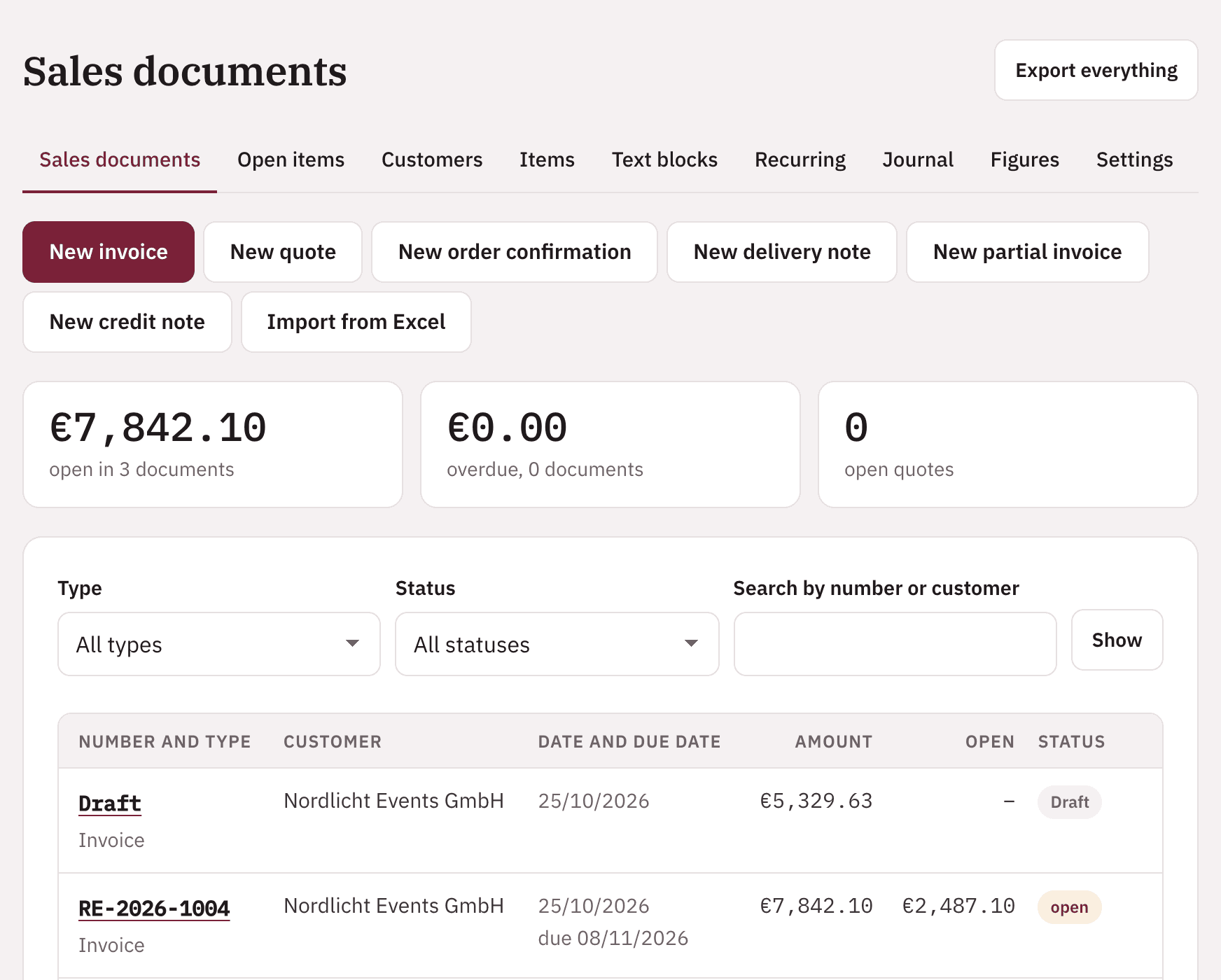
Document list in Rekana Rechnung with sample data: buttons for a new invoice, quote, order confirmation, delivery note, partial invoice, or credit note, open and overdue amounts, and a list of invoices with their status
Rekana Rechnung, shown here with sample data

Features

From quote to payment in one program

In your browser on your computer or phone, with buttons and text in several languages. Invoices are created in German or English.

01

Quotes and invoices

With a single click, a quote becomes an order confirmation, delivery note, or invoice. The final invoice deducts the partial invoices automatically.

02

Bank statements

You upload bank statements as CAMT is an XML format based on ISO 20022 that banks use to provide bank statements as downloadable files., MT940 is an older SWIFT file format for electronic bank statements that many banks still offer., CSV, or Excel files. The program matches your receipts.

03

Match receipts

You upload receipts or scan them with your phone. The program suggests the matching bank transaction, including partial payments.

04

Reminders and recurring invoices

You trigger payment reminders and dunning letters yourself. Recurring invoices run as a series, from weekly to yearly.

Matching receipts with sample data: a PDF invoice is matched to the corresponding bank transaction, with date, name, and amount, and the “Undo match” button
If a match is wrong, you can undo it. Sample data.

E-invoicing

E-invoices that follow the rules, checked before issuing

Invoices, partial invoices, corrective invoices, and credit notes are created as ZUGFeRD is a format for e-invoices: a readable PDF with the invoice data embedded as an XML file. in the EN 16931 is the European standard that defines the content and structure of an e-invoice. profile. You download the XRechnung is a German standard for e-invoices as a pure XML file, designed mainly for invoices to public authorities. 3.0 or send it along.
  • Before issuing, the program checks every e-invoice against EN 16931. If the check finds an error, the invoice is not issued.
  • The XRechnung is also checked against its own rules before it is sent or downloaded.
  • The check covers the file structure, not the tax content.
  • Incoming e-invoices are shown in a readable format.

Document types and numbers

Seven document types with clear number ranges

Quote, order confirmation, delivery note, invoice, partial invoice, corrective invoice, and credit note. You choose which types to use in the settings.

Standard numbering

Quotes, order confirmations, delivery notes, invoices, and dunning letters each have their own number range. Partial invoices, corrective invoices, and credit notes also have their own ranges or, if you prefer, use the invoice range.

DATEV numbering

A button switches to seven-digit sequential numbers. The first digit shows the type, such as 4 for invoices, 5 for corrective invoices, and 6 for credit notes. Corrective invoices and credit notes then get their own ranges; partial invoices stay with invoices.

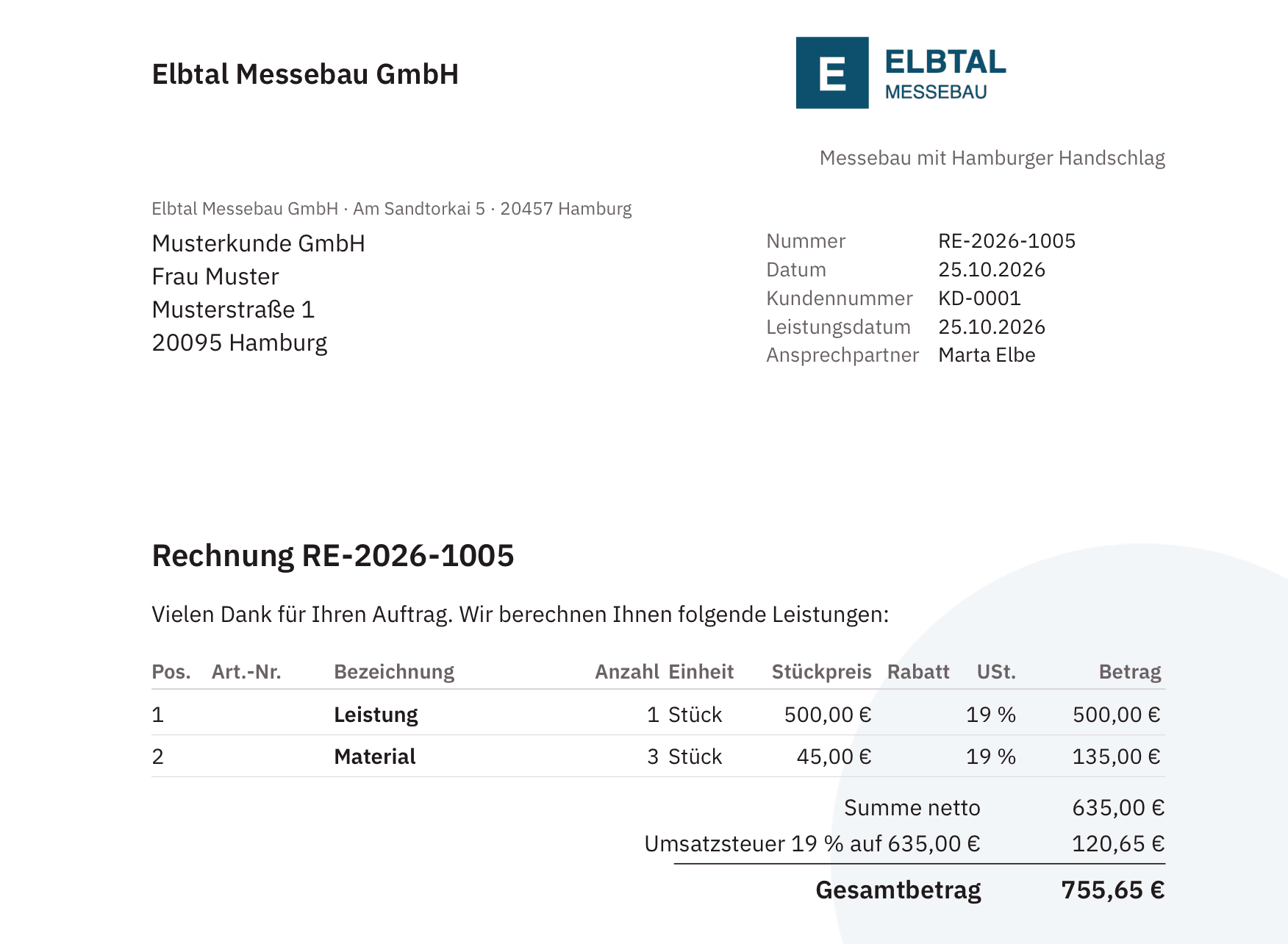
Sample invoice from Rekana Rechnung: letterhead with logo and tagline, customer address, invoice number, two line items with VAT, and total amount
Invoice with letterhead and logo, sample data

Design

Your invoice on your letterhead

When ordering, you pick your industry template: Services and consulting, Building cleaning and janitorial services, Construction and trades, Export and wholesale, Retail and e-commerce, Car dealers and repair shops, Restaurants and catering, Events and rentals, or IT and software. It presets document types, texts, columns, and payment terms. Then you design it yourself.

  • Logo and letterhead as an image behind the first page or all pages
  • Five layouts and your color for headings and lines
  • Columns and standard texts for each document type in German and English
  • GiroCode on the invoice: your customer pays with their banking app

If a detail is missing, let us know. You set up the design yourself; if you’d like GKM to do it for you, we agree on that separately.

Import

Import customers and line items from Excel

What you already have in spreadsheets doesn’t need retyping. The program reads Excel and CSV and checks each row before saving.

  • Your customer list with our Excel template, up to 5,000 customers per file
  • Line items straight into any document, up to 5,000 per file
  • Preview with errors per row; only error-free rows are saved
  • Export in the same format to edit and import again

Sending and export

Send invoices and hand everything to your tax advisor

You email e-invoices directly from the program, from our address e-rechnung@gkm-buchhaltung.de or your own. Quotes, delivery notes, and dunning letters are sent from your own address. You can also download any document.

Your tax advisor doesn’t need access. “Export everything” provides each invoice as a PDF and e-invoice, plus the outgoing invoice register, payments, customers, and the log. You can export bank transactions and the document journal for any period as Excel or CSV.

Price

Included with ongoing bookkeeping, otherwise one monthly price

The first three months are free. After that, you can cancel at any time, effective at the end of the current billing month.

  • An unlimited number of quotes, invoices, and e-invoices
  • An unlimited number of bank statements as files
  • One user
  • Upload, scan, and match receipts
  • Reminders, recurring invoices, and Open items are invoices to customers or from suppliers that have not yet been paid in full.
  • Export for your tax advisor

Only for businesses based in Germany: commercial businesses, self-employed people, freelancers, and companies.

Order

How to get started

  1. Order online

    You enter your company name, address, and payment method. You see the exact price before you submit.

  2. Confirm your email

    Use the link in our email to confirm your address and set your password.

  3. Set up two-factor authentication

    You secure your access with a code from an authenticator app.

  4. Activation by GKM

    We review your order and activate your access within three working days. Your three-month free trial then begins.

Plans

Rekana grows with your business

Today, Rekana Rechnung lets you write quotes, invoices, and e-invoices. Rekana Buchhaltung Komfort and Plus are in preparation.

For GKM clients

If GKM does your ongoing bookkeeping, you use Rekana Rechnung at no extra charge. You also see your bookkeeping by month in the client portal, with a clear overview of the VAT you pay and the input VAT you get back.

included

Rekana Rechnung

Quotes, invoices, and e-invoices, reminders, recurring invoices, bank statements, and receipts, as described on this page.

€7.99 a month

Rekana Buchhaltung Komfort, in preparation

Adds your own bookkeeping: postings under SKR03 and SKR04 are widely used standard charts of accounts from DATEV, templates for the numbers and names of accounts., cash book, Open items are invoices to customers or from suppliers that have not yet been paid in full., and export in DATEV format. You prepare your In the advance VAT return, Umsatzsteuer-Voranmeldung, a business reports VAT minus input VAT to the tax office monthly or quarterly. yourself and submit it with your own ELSTER certificate.

€14.99 a month

Rekana Buchhaltung Plus, in preparation

Adds AI that reads your receipts and suggests postings, including splits such as for business meals. You check and confirm every suggestion yourself.

€29.99 a month

All prices are net, plus VAT. Rekana Buchhaltung Komfort and Plus cannot be ordered yet. GKM clients who also want to do their own bookkeeping can add Rekana Buchhaltung Komfort or Plus later.

Security

Secure and traceable

Non-editable documents

Issued invoices can no longer be changed. A cancellation or corrective invoice gets its own number; for a new version, copy the invoice as a draft.

Log

Every action is logged and chained with checksums. “Export everything” includes the complete log.

Two-factor authentication

You secure your access with a code from an authenticator app. After five failed attempts, access is locked for 15 minutes.

Data center in the EU

Your data is stored with a German provider in a data center in the EU. The connection is encrypted.

Software for your own use. The program is not a substitute for tax advice. You are responsible for the content of your invoices.

Questions

Frequently asked questions about Rekana Rechnung

Do I have to be a GKM client?

No. Rekana Rechnung is a standalone program. If GKM does your ongoing bookkeeping, it is included in your portal access.

Who is this program for?

For businesses based in Germany: commercial businesses, self-employed people, freelancers, and companies. We do not sell it to consumers.

What happens after the three-month free trial?

The subscription then continues month by month at €7.99 a month plus VAT. We’ll send you an email reminder before the trial period ends.

How do I cancel?

In the client portal or by email to us, at any time, effective at the end of the current billing month. If you cancel within the first three months, the subscription ends immediately at no cost.

What happens to my invoices after I cancel?

After that, you can no longer issue new documents. You keep free read-only access until the end of the tenth calendar year after the contract ends. You can export all the documents you have issued: each invoice as a PDF and e-invoice, along with the outgoing invoice register, payments, customers, and the log.

Can I connect my bank?

No. You upload bank statements as CAMT, MT940, CSV, or Excel files. This works with any bank that lets you download statements as files in online banking.

Can I keep my existing invoice numbers?

Yes. Under “Continue numbering,” you set the next number for each number range. After that, the program continues the sequence without gaps.

Can I change an issued invoice?

No. Once you issue it, it is finalized and stored so that it cannot be changed. You cancel it or reduce it with a corrective invoice, each with its own number. Then you copy the old invoice as a new draft, edit it, and issue it again.

Can I issue invoices under the small business scheme?

Yes. If you use the Small businesses under § 19 UStG, Kleinunternehmer, charge no VAT because of their low revenue and cannot deduct input VAT., every invoice includes the notice under § 19 UStG.

Can I outsource my bookkeeping later?

Yes, to GKM, at a price on request. Your invoices, customers, and transactions stay in the same portal, and the program is then included.

Does the program replace my tax advisor?

No. You discuss tax questions with your tax advisor. You give them the export.

Phone
+49 40 2989 6395
Monday to Friday, 9 am to 8 pm
Email
info@gkm-buchhaltung.de
Reply within one business day
Office
Gerhofstraße 1–3
20354 Hamburg